APP設定
1. 點選帳戶 > 安全 > 2FA雙重驗證 > Google Authenticator 驗證碼 > 登入 > 輸入Google Authenticator 驗證碼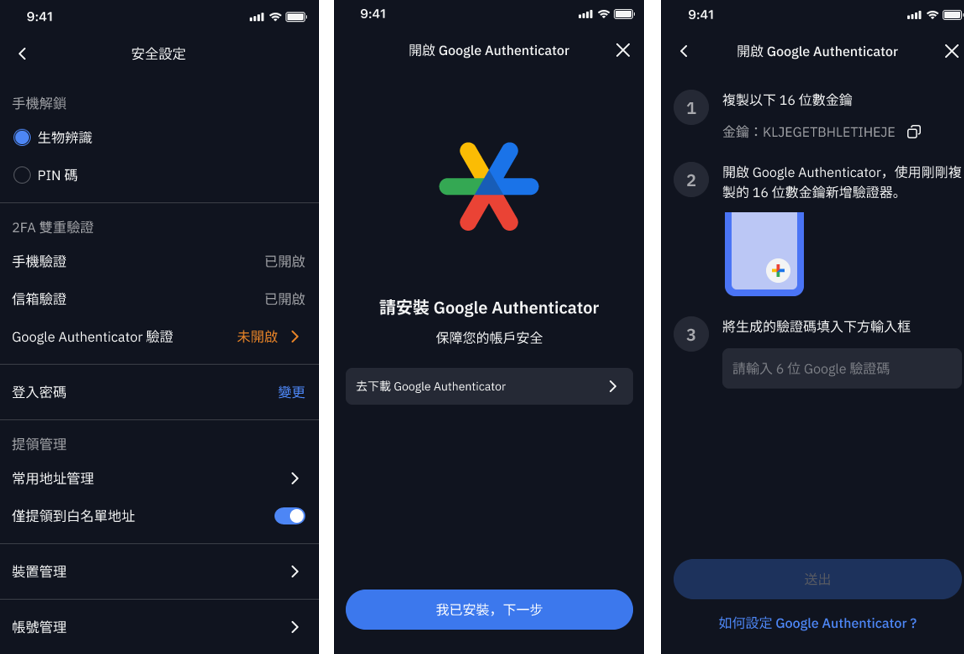
2. Google Authenticator APP 中,長按數字串,即可複製,在右下角圓圈倒數完之前,至 BitoPro「輸入 OTP 碼」中,貼上 6 位數密碼,設定即完成。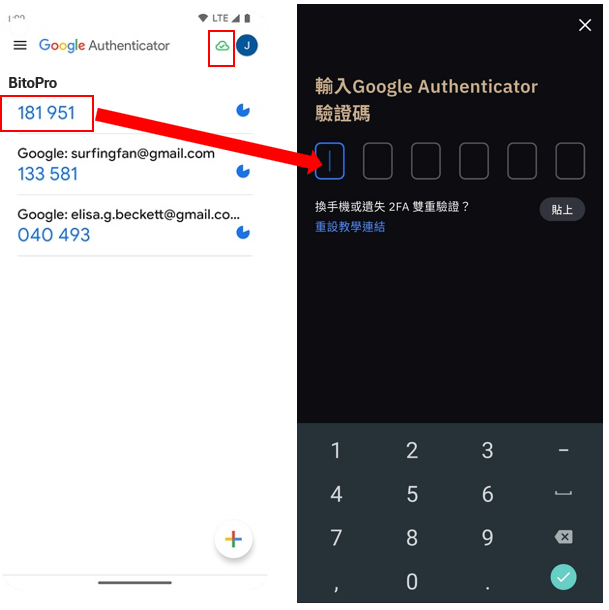
3. 為進一步提升帳戶整體安全性,建議會員同時啟用 Google Authenticator 驗證器之「登入」、「提領」,作為額外防護機制。每組驗證碼僅於 30 秒內有效,可有效降低帳號遭冒用風險。
設定路徑: 開啟 BitoPro App ➡︎帳戶➡︎安全設定➡︎Google Authenticator 驗證➡︎ 啟用「登入」、「提領」
4. 務必關閉 Google Authenticator 雲端同步,一旦您的 Google 帳號被盜,驗證碼也會遭竊取,進而影響 BitoPro 帳號安全。如何關閉 Google Authenticator 雲端同步?
WEB版操作
登入後 BitoPro 網頁→右上角【設定】→【安全】